FTC Safeguards Rule

The New FTC Safeguards Rule: Is Your Business Affected?

Person completing a cybersecurity shieldIn 2021, the FTC amended the Safeguards Rule (which originally took effect in 2003) to ensure its contents reflect advancements in technology. Originally, the rule was developed to ensure financial institutions protect consumers’ private data. According to the FTC, the 2021 update provides “more concrete guidance for businesses,” including the data security principles affected companies must implement. It will also now apply to a much broader scope of business types.
While the amendment was made in 2021 and the deadline for requirements is approaching, many companies still lack clarity about whether they’re affected and if so, what must be done to ensure compliance. Here’s a quick guide to the New FTC Safeguards Rule to help clear up any uncertainties.

Which Businesses Fall Under the FTC Safeguards Rule?

The amended rule expands the definition of financial institutions, meaning many businesses which previously were not impacted by the rule will be now. The 2003 Safeguards Rule was meant to regulate financial institutions — or organizations “significantly engaged in financial activities.” Now, however, it’s not just banks and similar financial institutions that will be covered under the rule.

By the FTC’s updated definition, affected organizations will be those significantly involved in financial activities, as well as activities incidental to such financial activities. In other words, companies that extend credit lines, offer loans, or are somehow involved with consumers’ ability to access money will all be regulated under the new rule. As the FTC puts it, “The definition of a ‘financial institution’ isn’t a hushed hall with tellers, deposit slips, and ballpoint pens on chains.”

In addition to financial institutions, the FTC cites several other examples of business types that will be impacted by the new rule:

  • BusinessCompanies that lease property on a nonoperating basis for 90 days or more, such as automobile, boat, motorcycle, RV, and other types of dealerships
  • Retailers that issue in-house credit cards
  • Payday lenders
  • Real estate settlement services
  • Companies that sell or print checks
  • Any company that wires funds
  • Accountants
  • Travel agents
  • Mortgage brokers
  • Financial counselors or advisors
  • Appraisers
  • Credit counseling services
  • Organizations that work as finders, or any business that charges a fee to connect consumers with lenders

Clearly, a seemingly simple change in verbiage makes the updated rule much more expansive, and many businesses will have to implement changes to ensure compliance with the rule before it takes effect. The above list isn’t exhaustive, however, so as the FTC notes, “If you aren’t sure if you’re covered, now’s the time to nail that down.”


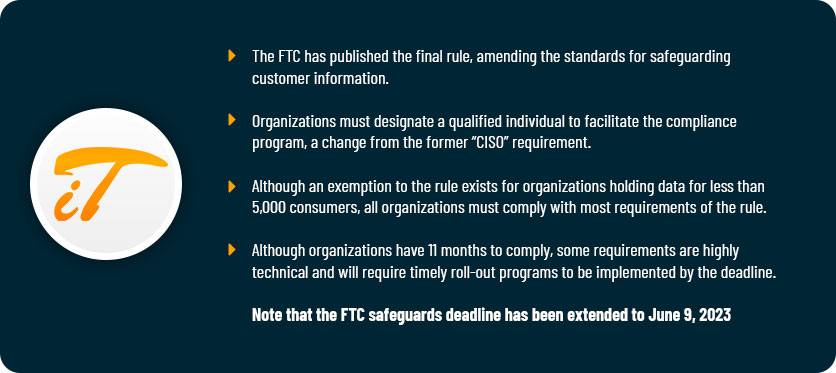
Updated FTC Safeguards Overview

When Does the FTC’s Revised Safeguards Rule Take Effect?

Originally, the deadline for the FTC’s Revised Safeguards Rule was December 9, 2022. The new deadline for the Revised Safeguards Rule is June 9, 2023. In November 2022, the FTC issued a statement which cited “reports of personnel shortages and supply chain issues” as the driver for the extension.

What to Do if Your Business Is Covered by the FTC’s Revised Safety Rule

At the most basic level, the Safeguards Rule requires covered organizations to develop, implement, and maintain a program that protects consumer data. Yet, the rule’s provisions are far more complex than that, calling for a written information security program that’s tailored to each business’s size, complexity, and nature of activities. According to the FTC, the program should:

  • Ensure security and confidentiality of customer data
  • Protect against anticipated threats or hazards to the integrity or security of private data
  • Protect against unauthorized access to that information which could harm or inconvenience customers

Indeed, covered companies will need to implement a robust information security program. The FTC outlines nine core elements for the program:

  • Designate a Qualified Individual to implement and supervise the program.
  • Perform a cybersecurity risk assessment to determine internal and external risks and threats to the confidentiality and integrity of customer data.
  • Design and implement safeguards to control identified risks. (This point has its own eight-step process, including encrypting customer data, implementing multi-factor authentication, and securely disposing of customer information.)
  • Routinely monitor and test the effectiveness of safeguards.
  • Educate staff with cybersecurity awareness training and routine follow-up training.
  • Monitor service providers and ensure they maintain the appropriate safeguards.
  • Keep your information security program up-to-date.
  • Develop a written incident response plan. (There are seven elements of this plan, outlined under Section 314.4(h) of the Safeguards Rule.)
  • Have your Qualified Individual report to the Board of Directors with annual written reports, which must include an overall assessment of compliance with the information security program.


As you can see, the requirements are robust and call for an equally comprehensive approach. When considering your company’s compliance measures, allow us to assist by providing sophisticated solutions for data security that fit your business’s unique needs.


Why A Managed Service Provider Is Valuable for Your Business

Learn why using a Managed Service Provider, or MSP, is a smart move for your business and the associated benefits.

As a business owner, you most likely know the importance of being able to set your company apart from the competition when it comes to your marketing plans. Whether it’s by strategic marketing tactics, a viral/word-of-mouth campaign, or tried-and-true advertising techniques, factoring in the various ways to market your business as efficiently and cost-effectively as possible is always at the forefront of your thinking.

What might not always be considered is the cost and effort to manage and deliver your IT services. IT infrastructure plays a major role in ensuring your business is efficient and productive. However, as many business owners can attest, simply just setting up an IT environment is not enough to make the most of the technology to make your business successful.

Over the past few years, many companies have come to realize the enormous cost of building and maintaining their IT infrastructure, and that they do not have the resources, know-how or people to run it.

That is where a Managed Service Provider, or MSP, comes in. Increasingly acknowledged as a strategic outsourcing partner that can remotely manage a company’s IT services, this valuable resource is becoming a more viable option for the talent and technology knowledge that many businesses simply lack.

You and your staff should be focused on the daily tasks that drive profits and grow your business. Partnering with a knowledgeable managed service provider can act as an extension of your existing team, providing great value and helping your business succeed.

What is a Managed Service Provider (MSP)?

A managed service provider (MSP) delivers a variety of IT-related services through ongoing active support on customers’ premises, in their MSP’s data center (hosting), or via a third-party data center. MSPs assist organizations by providing necessary technical services and active monitoring that keep your day-to-day operations running.

Managed service providers come in a variety of sizes and service capabilities. Some may have thousands of clients and an extensive supply of tools available to support a business globally, while others may specialize in a specific network system and are better suited to support smaller or more local organizations. But no matter the size or scope, your selected MSP must be able to allocate their resources, knowledge, time, and employees toward serving their customers and their unique needs.

There is no one-size-fits-all solution when it comes to IT. Your MSP should understand the needs of both your industry and your organization as well as any specialized software and regulatory compliance that may apply.

What type of services are offered by an MSP?

An MSP can take on a wide variety of tasks that are imperative to the success of a business but are not necessarily consumer facing. Many companies decide to enlist an MSP to outsource these technical or operational processes due to a lack of expertise or to make processes more efficient so they can focus more on the everyday tasks for the company.

The services provided by an MSP can be offered at a client’s place of business or fully remote. The first step to deciphering the type of services your MSP will provide is to determine what technologies and services are specifically needed for the business.

MSPs offer a variety of services including:

  • Data center management
  • Network management and monitoring
  • Mobile Device Management
  • Infrastructure management
  • Backup and Disaster Recovery
  • Communication management
  • Security management
  • Hardware maintenance
  • Cybersecurity
  • IT training for staff

How is an MSP different from traditional IT service providers?

The use of MSPs and other outsourced IT providers offer a cost-effective way to access needed technology experience and resources that a company may not have in-house, producing desired results for a fraction of the costs versus permanent in-house personnel.

However, unlike many traditional IT providers, an MSP is comprised of a specialized team of professionals who understand your specific needs, creating custom solutions and processes designed to boost efficiency and productivity versus traditional IT outsourcing which serves as an IT department, fulfilling multiple needs at once. Many MSPs work via a contract or agreement that is more suited to fit both your company’s technological needs and budget. Your selected MSP should primarily be focused on the end result for the service/services that you have retained them for.

At the end of the day, when it comes to your selected MSP, you want to be sure it’s managed in the most effective way to ensure you are receiving a high ROI. It’s critical that your MSP provides the appropriate technical personnel who can handle the numerous tasks related to your specific IT needs and the infrastructure is a proven asset to your business.

4 benefits to using a managed service provider

According to NTT’s 2021 global managed services survey, there are many benefits associated with the use of a managed services provider. Some of these benefits include reduced costs, access to top technical and industry expertise, and valuable insight as to how your business is run.

  1. Cost savings.
    Outsourcing with a managed service provider allows business owners to reduce the cost of dedicated employees working in-house as well as the technology, tools, and other resources required to handle any number of IT-related tasks. An MSP can also offer variable billing models which offer businesses flexibility and scalability.
  2. Experience and knowledge.
    MSPs have the experience, expertise, and knowledge in the targeted services being provided that allow for greater accuracy and a reduction of risk. Ensure that your selected MSP is fully compliant with government regulations and industry standards.
  3. Best-in-class tools, technology, and resources.
    The knowledge and experience supplied by your MSP will help in streamlining a number of processes and procedures. MSPs are accustomed to investing in the latest technologies and have extensive expertise in ways that individual companies may not, often resulting in greater efficiency and performance.
  4. Valuable business insight.
    As a business owner, you may gain greater visibility and more insight into how your business is run and the IT services you require from your MSP. This in turn can lead to better and more strategic decision making based on real-time information and analyses.

Why select IT ArchiTeks for your MSP?

When you outsource your managed services, you can set your focus more on your business rather than the IT services behind the scenes. The additional benefits gained from partnering with a managed service provider will help you oversee your business to the best of your ability.

IT ArchiTeks is your one stop solution for managed IT services. One of the leading IT service providers in Dallas, Plano, McKinney, Irving and Frisco, Texas, we successfully take care of the IT management, monitoring and maintenance needs of your business.

Click here for more information about our managed services plan and get in touch with IT ArchiTeks today to enjoy the benefits of IT without worrying about the crucial backend tasks.

Is Your Company’s Data Disaster Proof?

Person completing a security shieldIf you’re still telling yourself that you live in a safe area where natural disasters never strike so you don’t need to worry about investing in a disaster recovery plan for your business, it’s time to start rethinking what disaster recovery means. When something goes wrong on individual devices or within your IT infrastructure, a great disaster recovery plan can mean the difference between getting your business back up and running in minutes or struggling to recover all your information for days, weeks, or longer.

What Could Possibly Go Wrong?

Any number of natural and human-made disasters can happen at any moment, and if your data isn’t protected, you may lose time and money. When you hear disaster, you probably think of things like fires, floods, hurricanes, or earthquakes. These things do happen, but many businesses convince themselves they don’t need a disaster recovery plan because, the odds are, they’ll never experience a disaster of this magnitude. However, a good disaster recovery plan will also protect your business from the kinds of disasters that happen every day – the human kind. You have at least one employee who will fail to save an important document. Who will click on anything. Who will not use strong passwords to protect their devices. That’s why true data recovery is your business’ shield from disasters when data is lost through:

  • Human error
  • Fraud
  • Ransomware
  • Cyber security breaches
  • IT system failures
  • Power outages

Person reviewing their data continuity planHow is Data Continuity Different than Data Recovery?
Disasters and emergencies, by their very natures, can’t be planned for. While all businesses do their best to protect their equipment and facilities from potential damage, you simply can’t always see the disaster coming. Even if you can get equipment replaced after a disaster, you may lose data, and at the very least, you’ll lose time recovering it. This can negatively impact your business reputation, your relationship with clients, and your ability to recover fully from the disaster.

That’s why we take data recovery a step further with data continuity through Datto, offering Data Recovery as a Service (DRaaS). To ensure your business is up and running right away no matter what happens, you need data continuity. That means a system that doesn’t just backup individual programs or files. Instead, we use an image-based backup system to capture an entire virtual environment that can be replicated on any device. That includes programs, files, and settings. DRaaS is not just backing up individual files or programs in one location. Our image-based disaster recovery and backups are saved locally and in a cloud-based setting, creating redundancy, so your data is always secure and easily recoverable from anywhere.

As an example, if an employee clicks on a scam email, their device crashes. They can simply switch to another device, using a virtualized version of their system from the last recovery point and keep working while the support team fixes the issue. This can be done at any level from an individual device to a full, system-wide crash. Your data is always a few clicks away, saving you time and money and keeping your business running smoothly. No matter what happens.

Team member working while being protected by security team memberWhat is the Cost of Not Investing in Data Continuity?


There are two variables you need to calculate to determine the true cost of a disaster for your businesses: Recovery Time Objective (RTO) and Recovery Point Objective (RPO). RTO is the amount of time you lose between the moment a disaster occurs and the moment you recover your data. RPO is the amount of data lost between the last time your system was backed up and the moment the disaster occurs. Both of these things have a cost, and you can calculate this cost for your business, by inputting the answers to 8 simple questions into our calculator.

Why Should I Work with IT ArchiTeks for Data Recovery?

At IT ArchiTeks, we work with Datto to offer a complete data recovery and continuity strategy that offers unlimited cloud backups, a continually monitored system to ensure your backups are saved and accessible, and commitment to provide complete, timely support whenever your business experiences a data breach. If you’re ready to work with us, don’t hesitate to get in contact. We look forward to talking more about how to keep your business up and running – no matter what disaster comes your way.

Network Security Tips for Your New Remote Workforce

Woman working from home on video call

In recent years, many businesses have started to shift from large offices with everyone on-site for work to more diverse workforces with telecommute team members who can live up the street or on the other side of the globe. Then, the coronavirus disease 2019 (COVID-19) pandemic happened. Suddenly, allowing employees to telecommute isn’t optional – It’s essential. Whether you’ve already started transitioning to a more remote workforce or you’ve never had employees working offsite before, keeping your staff, customers, and communities safe means you may need to find a way to make telecommuting work. If you’re sending employees offsite, you could find yourself worried about the increased risk for hacking, data loss, and other network security issues. While it can be difficult to cut those computer chords and let employees work outside the controlled environment of your office, it is likely the right thing to do in response to shelter-in-place orders related to the COVID-19 pandemic, and the IT ArchiTeks team can help you create a network security plan for your new remote workforce.

Continue reading “Network Security Tips for Your New Remote Workforce”

5 IT Must Haves for Businesses of Any Size

Smiling man with headset looking at computer screen

Does this sound familiar? “I don’t need an IT department. My company only has five employees.” What about, “We’re doing fine on our own for now. We’ll worry about IT services if our company gets really profitable.” For new and growing businesses, it can be easy to rationalize skipping expenditures related to IT services, but if you don’t start out with a good infrastructure, your company may be at risk as it grows. You don’t need the same plan that would be recommended for a multi-billion dollar business, but you should have some basics in place.

Continue reading “5 IT Must Haves for Businesses of Any Size”

Frequently Asked Questions About Cybersecurity & Your Online Business

IT professionals monitoring online business

As cybersecurity threats against all types of businesses increase, many clients contact IT ArchiTeks with questions about what they can do to protect their business, how cybercriminals can get access to their information, and other basic inquiries about keeping their online business safe and successful. In this blog, we’ve taken the time to answer the frequently asked questions we hear about cybersecurity risks to online businesses. This is by no means a comprehensive list, so don’t hesitate to reach out if you want to learn more about our cybersecurity solutions.

Continue reading “Frequently Asked Questions About Cybersecurity & Your Online Business”

5 Ways Cybercrime Impacts Small Businesses

Woman working on laptop in floral shop

As a business owner or manager, you have likely heard about a variety of cybersecurity threats, but you may not be aware of what is actually at risk. When cybersecurity breaches occur, your business can lose data, profit, and more. To help you understand why your business needs to take the appropriate network security measures, we’ve put together a list of the top five ways that cybercrime can impact businesses of all sizes.

Continue reading “5 Ways Cybercrime Impacts Small Businesses”

Do I Need a Professional to Set Up My VoIP System?

Business man on cellphone looking at laptop

Before you decide whether or not you should work with professionals to install your VoIP system, you might want to take a moment to discuss what exactly a VoIP system is. VoIP is an acronym that stands for Voice over Internet Protocol. That sounds complicated, but it’s essentially just technology that allows us to transform the complicated phone systems used by businesses into simple, online systems that handle incoming and outgoing calls, voicemail, and even video conferencing and other communication tools. There are many different types of VoIP systems available, and if you’re ready to upgrade your business’ communication system, VoIP may be the best option.

Continue reading “Do I Need a Professional to Set Up My VoIP System?”

7 Common Types of Cybercrimes Impacting U.S. Businesses

Business woman worried after cyber attack

In 2019, you likely heard about at least one major business that was impacted by cybercrime, and even if you’re using security software and taking other steps to keep your business safe, do you really know what the risk is? There are many different types of cybercrimes that can negatively impact businesses of all sizes and knowing about the types of attacks can help you invest in cybersecurity measures to protect your business, so yours is not the next business dealing with the fallout from cybersecurity breaches. From lost work hours and the cost of repairing the damage to ruined professional reputations, cybersecurity breaches can profoundly impact a businesses’ ability to be successful.

Continue reading “7 Common Types of Cybercrimes Impacting U.S. Businesses”

PBX VS VoIP – Is There a Difference?

Phone head set with app icon animations

PBX and VoIP are two types of communication networks used to route phone calls, voicemail, and other types of business communication. In recent years, many business owners have moved away from analog PBX systems (landline phone networks) that require physical phone control systems either in the office or hosted offsite. Instead, more people are using cloud-based calling systems that route communication through online software using the internet. In addition to freeing up space in the office and cutting unnecessary costs paid to phone companies, VoIP systems also allow businesses to personalize and integrate unique software and technology to improve business communications. Whether your employees are all in one office, spread across several locations, or you have a mostly remote workforce, VoIP systems give you the flexibility to route calls, capture voicemails, conference in numerous callers, and even use voice menus and video conferencing tools. In most cases, your employees can even use their computers or their own cellphones, so you don’t even have to worry about traditional phone handsets. The possibilities are endless when it comes to the many ways that VoIP improves business communication.

What is PBX?

Traditional telephone exchange and server hybrid system

Private Branch Exchange (PBX) phone systems are the old-fashioned systems set up using landline telephones that are connected to terminal adaptors that move calls between individuals within a phone network. If you’ve ever watched a movie or TV show set in the early days of telephone use, you may have seen one of the original PBX systems that required employees to physically plug wires into connectors that routed calls to the correct recipient.

Modern PBX systems still use an exchange system like these old-fashioned solutions, but the new PBX systems are much smaller and more manageable. Using an on premise or remote call controllers or servers, calls are routed to your employee’s office phones. Housed within your phone’s handset, are the necessary tools that allow your employees to select extensions, make calls, leave voicemails, and perform a number of other tasks. Traditional or “analog” PBX systems are run through a phone line. They need to be plugged into these lines, and most phone services require monthly service fees and ongoing maintenance.

What is Hosted PBX?

Hosted PBX is a hybrid of the analog exchange systems and Voice Over Internet Protocol (VoIP) systems. Rather than using a call control center or onsite network (plugging your phones into a phone line), Hosted PBX systems use an internet connection to receive and route incoming calls and send outgoing communications through an offsite system that is typically still managed (hosted) using a traditional PBX call control center format. While you don’t have to deal with any of the physical PBX hardware on site, someone else is still hosting an analog PBX for your business.

Is there a Difference Between VoIP & Hosted PBX?

Group of people using a video conference system

VoIP systems, which are also called IP telephone or cloud-hosted PBX systems, are entirely run online via cloud systems. Your internet network is your phone network. All of your calls, voicemails, conferencing, and other features are controlled through cloud-based software, so on-site hardware is virtually eliminated. All you need is a phone that has the capability to function within a VoIP system and an internet connection. Most devices that connect to the internet (cell phones, computers, tablets) can be used to make calls.

How Can I Switch My Business to a Hosted or Cloud-Based Phone System?

If you’re interested in switching from an analog or traditional hosted PBX system to a cloud-hosted VoIP system, the IT ArchiTeks team can help. We offer VoIP installation and maintenance services to help you make the most of your communication network. Still not sure that VoIP is the best option for your business? Give our team a call. One of our knowledgeable experts will be happy to talk to you about your options and help you find the ideal solution that works for your business needs.