
The choice is clear for trucking companies in 2025: merely survive cyber threats or build the resilience to thrive despite them. According to the NMFTA’s 2025 Trucking Cybersecurity Trends Report, our industry faces mounting challenges from ransomware, cloud-based attacks, and social engineering schemes that can compromise credentials in under a minute. While some operations struggle to recover from attacks, others bounce back within hours. The difference lies in three critical pillars of cyber resilience that can transform your vulnerability into strength.
Three Pillars of Cyber Resilience
Comprehensive Security Architecture – Modern trucking operations need multiple layers of defense. Basic IT support isn’t enough – you need advanced identity protection, multi-layered cloud security, and continuous threat monitoring. Regular security assessments identify weak points before attackers can exploit them, while battle-tested backup systems ensure rapid recovery.
Incident Response Planning – A plan collecting dust is no plan at all. Your incident response strategy must be living, tested, and regularly updated – like military battle plans. When systems are compromised, every team member should know their role, from frontline employees to top executives. Regular drills ensure your response remains sharp and effective as threats evolve.
Business Continuity Strategy – Could your operation survive if critical systems failed tomorrow? Success requires documented manual procedures, tested backup communication methods, and offline copies of essential data. These protocols must be ready at a moment’s notice.
Lessons from the Battlefield
2024 taught us clear lessons about cyber resilience. Companies that thrived shared common traits: rigorous security assessments, updated response plans, continuous training, and regular system testing. They understood that resilience isn’t a destination – it’s an ongoing commitment to excellence.
The Price of Unpreparedness
When systems fail, the cascade is devastating. Operations freeze. Compliance violations mount. Customer trust, built over years, erodes within hours. The impact extends far beyond immediate financial losses, threatening your company’s very survival.
The IT ArchiTeks Advantage
Building resilience demands expertise in both trucking operations and cybersecurity. We bring both, identifying vulnerabilities before attackers can exploit them. Our battle-tested tools and deep industry understanding ensure protection without disrupting operations.
Looking Ahead
In 2025’s evolving threat landscape, standing still means falling behind. Building resilience requires continuous assessment, improvement, and adaptation. Don’t wait for a breach to test your defenses. Contact IT ArchiTeks today to transform your operation from surviving to thriving.





 In 2021, the FTC amended the Safeguards Rule (which originally took effect in 2003) to ensure its contents reflect advancements in technology. Originally, the rule was developed to ensure financial institutions protect consumers’ private data. According to the FTC, the 2021 update provides “more concrete guidance for businesses,” including the data security principles affected companies must implement. It will also now apply to a much broader scope of business types.
 Companies that lease property on a nonoperating basis for 90 days or more, such as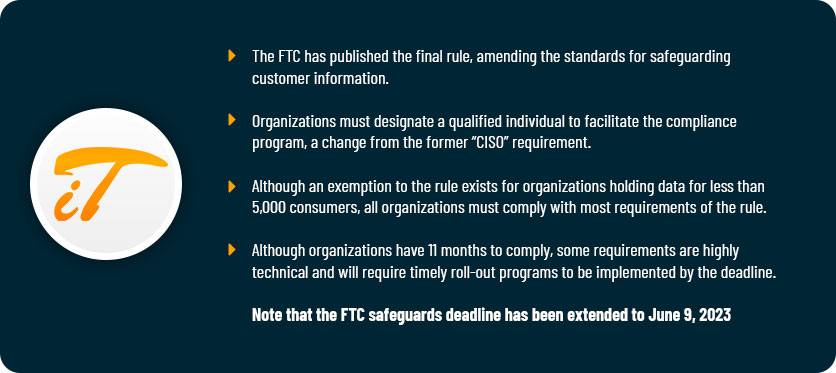


 How is Data Continuity Different than Data Recovery?
 What is the Cost of Not Investing in Data Continuity?